Note
Click here to download the full example code
Corner Plots
The corner() function produces a full
corner plot with FFT-KDE contours, CI bands, truth markers, and a clean legend.
All examples share the same synthetic GW-inspired posterior so outputs are
directly comparable.
See also: Cornetto.plot(), quick_corner()
Data input shapes
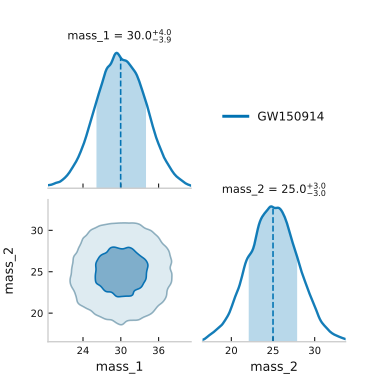
Cornetto accepts a dict[str, array]. Arrays can be 1-D (single chain)
or 2-D (N_chains, N_samples) for multiple chains in one call.
import numpy as np
from cornetto import corner

rng = np.random.default_rng(0)
N = 20_000

# Single chain — plain 1-D arrays
data_1chain = {
    "mass_1": rng.normal(30, 4, N),
    "mass_2": rng.normal(25, 3, N),
}

fig, axes = corner(data_1chain, chain_labels=["GW150914"])
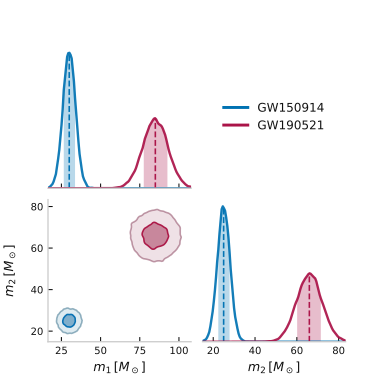
Two chains in one call — 2-D (N_chains, N_samples) arrays.
Labels accept LaTeX via raw strings.
labels_2 = {
    "mass_1": r"$m_1\,[M_\odot]$",
    "mass_2": r"$m_2\,[M_\odot]$",
}
data_2chains = {
    "mass_1": np.stack([rng.normal(30, 4, N), rng.normal(85, 8, N)]),
    "mass_2": np.stack([rng.normal(25, 3, N), rng.normal(66, 6, N)]),
}

fig, axes = corner(data_2chains, labels=labels_2,
                   chain_labels=["GW150914", "GW190521"])
Shared synthetic posterior
Four parameters drawn from simple distributions, mimicking a compact-binary posterior.
data = {
    "mass_1": rng.normal(30, 4, N),
    "mass_2": rng.normal(25, 3, N),
    "spin":   rng.uniform(-1, 1, N),
    "dist":   rng.exponential(400, N),
}

labels = {
    "mass_1": r"$m_1\,[M_\odot]$",
    "mass_2": r"$m_2\,[M_\odot]$",
    "spin":   r"$\chi_{\mathrm{eff}}$",
    "dist":   r"$d_L\,[\mathrm{Mpc}]$",
}
Default corner plot
FFT-KDE contours, shaded CI band, truth markers on mass_1 and spin.
fig, axes = corner(
    data,
    labels=labels,
    truths={"mass_1": 30.0, "spin": 0.0},
    chain_labels=["GW200129"],
)
![$m_1\,[M_\odot]$ = $30.0^{+4.0}_{-4.1}$, $m_2\,[M_\odot]$ = $25.0^{+3.0}_{-3.0}$, $\chi_{\mathrm{eff}}$ = $-0.01^{+0.70}_{-0.67}$, $d_L\,[\mathrm{Mpc}]$ = $279^{+455}_{-210}$](../images/mkd_glr_plot_0_corner_003.svg)
Coral color, dark theme
Use the built-in "coral" color and flip to a dark background.
fig, axes = corner(
    data,
    labels=labels,
    truths={"mass_1": 30.0},
    chain_labels=["GW200129"],
    color="coral",
    dark=True,
)
![$m_1\,[M_\odot]$ = $30.0^{+4.0}_{-4.1}$, $m_2\,[M_\odot]$ = $25.0^{+3.0}_{-3.0}$, $\chi_{\mathrm{eff}}$ = $-0.01^{+0.70}_{-0.67}$, $d_L\,[\mathrm{Mpc}]$ = $279^{+455}_{-210}$](../images/mkd_glr_plot_0_corner_004.svg)
Teal color, contour lines only
fill_contours=False draws only the contour lines — useful for overlaying
multiple distributions without filling.
fig, axes = corner(
    data,
    labels=labels,
    chain_labels=["GW200129"],
    color="teal",
    fill_contours=False,
    contour_lw=1.5,
)
![$m_1\,[M_\odot]$ = $30.0^{+4.0}_{-4.1}$, $m_2\,[M_\odot]$ = $25.0^{+3.0}_{-3.0}$, $\chi_{\mathrm{eff}}$ = $-0.01^{+0.70}_{-0.67}$, $d_L\,[\mathrm{Mpc}]$ = $279^{+455}_{-210}$](../images/mkd_glr_plot_0_corner_005.svg)
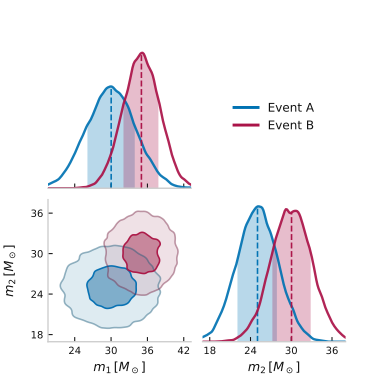
Two-chain comparison
Pass a 2-D (N_chains, N_samples) array to overlay two events.
chain_labels names each chain in the legend.
data_2 = {
    k: np.stack([data[k], rng.normal(data[k].mean() + 5, 3, N)])
    for k in ["mass_1", "mass_2"]
}

fig, axes = corner(
    data_2,
    labels={k: labels[k] for k in ["mass_1", "mass_2"]},
    chain_labels=["Event A", "Event B"],
    color="cornetto",
)
Three sigma levels
Add a third contour at 3σ (98.9 % 2-D probability mass).
![$m_1\,[M_\odot]$ = $30.0^{+4.0}_{-4.1}$, $m_2\,[M_\odot]$ = $25.0^{+3.0}_{-3.0}$, $\chi_{\mathrm{eff}}$ = $-0.01^{+0.70}_{-0.67}$, $d_L\,[\mathrm{Mpc}]$ = $279^{+455}_{-210}$](../images/mkd_glr_plot_0_corner_007.svg)
Total running time of the script: ( 0 minutes 6.543 seconds)
Download Python source code: plot_0_corner.py