User guide
Data input
Cornetto takes a dict[str, array]. Arrays can be 1-D (single chain) or 2-D
(N_chains, N_samples) for multiple chains.
1-D arrays are broadcast across chains. Useful for a shared prior parameter.
Some chains may not have data for every parameter. Pass a shorter 2-D array - trailing chains are automatically absent for that parameter:
data = {
    "mass": np.stack([chA_mass, chB_mass, chC_mass]),  # (3, N)
    "spin": np.stack([chA_spin, chB_spin]),            # (2, N) - chC absent
    "dL":   np.stack([chA_dL,   chB_dL]),              # (2, N) - chC absent
}
corner(data, chain_labels=["A", "B", "C"])
For non-trailing absences, pass a list with None in the missing slot:
data = {
    "mass": np.stack([chA_mass, chB_mass, chC_mass, chD_mass]),  # (4, N)
    "spin": [chA_spin, chB_spin, None, chD_spin],                # chC absent
    "dL":   np.stack([chA_dL, chB_dL, chC_dL, chD_dL]),          # (4, N)
}
corner(data, chain_labels=["A", "B", "C", "D"])
Absent chains are skipped in KDE, statistics, and all panels for that
parameter. They still appear in the legend if given a chain_labels entry.
Hard cap: MAX_CHAINS = 10. Override per call with max_chains=....
Multi-chain plots
Each chain gets its own colour from CORNETTO_PALETTE (a jewel-tone palette of
10 entries). Legend, contour colours, and titles update automatically.
corner(
    data,
    chain_labels=["GW150914", "GW190521"],
    truths={"m1": np.array([36.0, 85.0])},   # one truth per chain
)
For two chains where you want one on the lower triangle and the other on the
upper, use Cornetto.pairplot:
# %%
from cornetto import Cornetto

a = Cornetto(chain_A, chain_labels=["Model A"])
b = Cornetto(chain_B, chain_labels=["Model B"])
fig, axes = a.pairplot(b, other_label="Model B", other_color="coral")
fig.savefig("comparison.pdf", bbox_inches="tight")
Weights
Importance-sampling weights are supported for every path (single, multi-event,
summary(), quick_corner).
corner(data, weights=w)                      # one weight array for all events
corner(data, weights=[w_A, w_B])             # per-event
corner(data, weights=[w_A, None])            # event B uses uniform weights
Weights are normalised internally; NaN-ish samples are masked per-parameter.
Subsampling
For heavy chains, thin before KDE to cut cost without changing the plot:
The top-level quick_corner defaults to subsample=20_000 for responsiveness.
Statistics
The shaded band and central line on each 1-D panel come from a stat function. Built-ins:
stat= |
Central | Interval |
|---|---|---|
"median" (default) |
median | 16 / 84 % |
"median_mad" |
median | ± MAD |
"median_hdi" |
median | 68 % HDI |
"mean" |
mean | ± std |
Custom statistics
def stat_mode(samples, weights=None):
    # your logic; must return this dict shape
    return dict(center=..., lo=..., hi=..., label="mode")

corner(data, stat=stat_mode)
Contour levels
Pass n-sigma values; cornetto converts them to 2-D probability-mass levels via
P(n) = 1 - exp(-n^2 / 2).
Appearance
Everything cornetto draws is configurable through plot kwargs. The sections below group them by what they affect.
Colors
Two ways to pick colors, plus one default that just works.
Named palettes - single-chain presets:
| Name | Base colour |
|---|---|
"cornetto" (default) |
#0072b2 ocean blue |
"indigo" |
#421eb8 |
"coral" |
#aa1348 |
"teal" |
#0da086 |
"gold" |
#c06b0c |
"ink" |
#1e1b4b |
Explicit list - one colour per chain. Accepts any matplotlib colour
(hex, rgb(...), named CSS, etc.):
Multi-chain default - without color=, cornetto cycles through a 10-hue
perceptually-balanced palette (cornetto.CORNETTO_PALETTE) so two or more
chains are distinguishable at a glance.
Theme
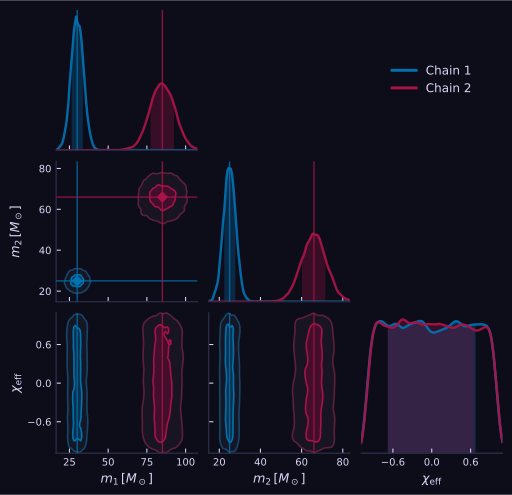
The dark theme is isolated from matplotlib's global rcParams - it applies
only to the current figure, even inside a notebook that sets its own style
elsewhere.
Panels
Per-plot toggles that shape the look of individual panels:
| Kwarg | Default | Effect |
|---|---|---|
fill_1d |
False |
Light tint under the 1-D KDE curve. |
fill_contours |
True |
Filled bands under the 2-D contours. |
contour_lw |
1.2 |
2-D contour line width. |
show_titles |
True |
value⁺ᵃ₋ᵦ heading above each diagonal panel (single chain). |
annotate_peaks |
False |
Tick marks at local PDF maxima on the diagonal. |
show_tension |
False |
Overlap-integral annotation (meaningful for 2 chains). |
label_pad |
0.08 |
hspace / wspace between panels. |
fig_size_per_dim |
2.0 |
Inches per parameter when figsize is unset. |
Truth markers
corner(data,
       truths={"m1": 30.0},
       kwargs_truths={"ls": "-.", "lw": 1.5,
                      "marker": "*", "markersize": 8})
Defaults: red (#e63946), solid line, diamond marker. Override any
matplotlib line/marker kwarg through kwargs_truths.
Delta mode
delta_mode=True subtracts the supplied truths from every chain and relabels
axes with a leading Δ. Handy to eyeball posterior deviations from the
injected/true values - everything centres on zero.
- Requires
truths(raisesValueErrorotherwise). - Per-chain truths (
truths={"m1": [30., 31.]}) subtract one value per chain, so every chain collapses around zero regardless of its true injected value. - Truth overlays are suppressed (they'd all lie at 0).
ax_limsis interpreted in delta space (e.g.{"m1": (-5, 5)}).- Works on
corner(),quick_corner(),marginal(),trace(),trace_marginal(), andpairplot()(whereverCornettobacks the plot).
Statistic styling
Per-stat visual overrides (line style and fill alpha on the diagonal):
Fine control - the Cornetto class
For repeated plots from the same dataset (no recomputation) or to inspect what was actually drawn:
c = Cornetto(data, chain_labels=["chain"])
fig, axes = c.plot(color="teal", dark=True)
c.info()              # print the exact setup used
c.summary()           # summary table (HTML in Jupyter)
print(c.latex())      # LaTeX table
Visual isolation from rcParams
Matplotlib's global state can leak across cells: if a notebook ran
plt.rcParams["font.size"] = 20 earlier, every plot afterwards is affected.
Cornetto wraps all drawing in plt.style.context("default") and its own rc
overrides, so your corner looks the same regardless of what ran before it.
Summary tables
# %%
c = Cornetto(data, chain_labels=["mock"])
tbl = c.summary()
tbl                        # renders as HTML in Jupyter
print(tbl)                 # plain text in the terminal
print(c.latex(caption="Posterior summary"))   # astropy-backed LaTeX
Columns: median, p16, p84, mean, std, one row per (param, chain).
Known gotchas
- LaTeX math in labels needs raw strings (
r"$m_1$").text.usetexis not required; cornetto forces it off for efficiency. N_samplesbelow ~50 disables KDE for that panel and falls back to a histogram (with aRuntimeWarning).